The core content of computer network learning is the learning of network protocol. A network protocol is a set of rules, standards or conventions established for data exchange in a computer network. Because different users' data terminals may adopt different character sets, the two need to communicate, and must be carried out on a certain standard. A very vivid analogy is our language. We have a large number of people, a large number of local languages, and a huge gap between dialects. The dialect of Region A may not be acceptable to the people of region B at all, so we have to establish a language standard for the communication of names across the country, and that is where our Mandarin comes in. Similarly, looking around the world, the standard language for us to communicate with foreign friends is English, so we have to learn English reluctantly and painfully. Computer network protocols are as diverse as our languages. The ARPA company introduced a network protocol called ARPANET from 1977 to 1979, which was widely popular, the most important reason is that it introduced the well-known TCP/IP standard network protocol. TCP/IP protocol has become the "common language" in the Internet.
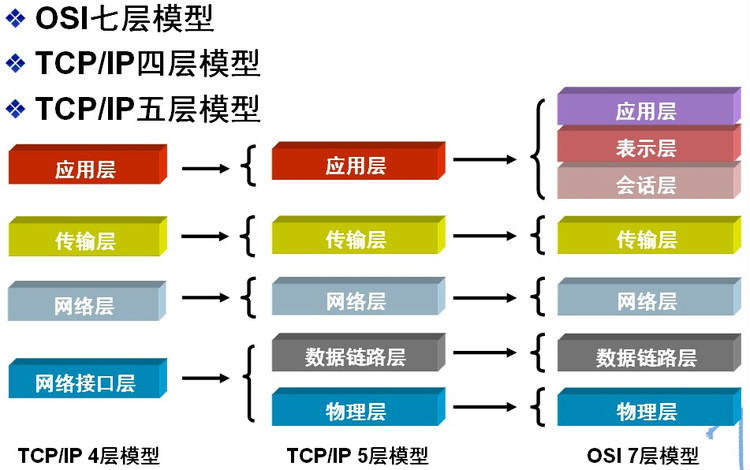
In order to enable computers produced by different computer manufacturers to communicate with each other in order to establish computer networks on a larger scale, the International Organization for Standardization (ISO) proposed the "Open System Interconnection Reference Model" in 1978. The famous OSI/RM Model (Open System Interconnection Reference Model). It divides the communication protocol of the computer network architecture into seven layers, from the bottom up: Physics Layer, Data Link Layer, Network Layer, Transport Layer, Session Layer, Presentation layer Layer), Application Layer. The fourth layer completes the data transmission service, and the upper three layers are to the user. In addition to the standard OSI Layer 7 model, the common network hierarchy is TCP/IP Layer 4 protocol and TCP/IP Layer 5 protocol, the corresponding relationship between them is shown in the following figure:
Subnet mask and network division With the continuous expansion of Internet applications, the drawbacks of the original IPv4 are gradually exposed, that is, the network number occupies too many bits, and the host number is too few, so the host address it can provide is increasingly scarce. At present, in addition to using NAT to allocate reserved addresses within the enterprise, Usually, IP addresses of a high class are subdivided to form multiple subnets, which can be used by different user groups. The main purpose here is to effectively use the IP address in the case of network segmentation, by taking the high part of the host number as the subnet number, extending or compressing the subnet mask from the usual network bit boundaries, to create more subnets for certain types of addresses. However, as more subnets are created, the number of available host addresses on each subnet decreases.
The subnet mask indicates whether two IP addresses belong to the same subnet. It is also a 32-bit binary address. Each of the subnet masks is 1, indicating that the IP address is the network bit, and 0, indicating the host bit. Like IP addresses, it is represented in dotted decimal notation. If two IP addresses are the same under the bit-sum calculation of the subnet mask, it means that they belong to the same subnet.
When calculating the subnet mask, we should pay attention to the reserved address in the IP address, that is, the "0" address and the broadcast address. They refer to the IP address when the host address or network address is all" 0" or "1". They represent the network address and the broadcast address, and generally cannot be counted.
For an IP address that does not need to be divided into subnets, the subnet mask is very simple, that is, it can be written out according to its definition: For example, a Class B IP address is 10.12.3.0 and does not need to be divided into subnets, the subnet mask of the IP address is 255.255.0.0. If it is a class C address, its subnet mask is 255.255.255.0. Other analogies will not be detailed. The key thing we want to introduce is an IP address, but also need to use its high host bit as a divided subnet network number, the rest is the host number of each subnet, then how to calculate the mask of each subnet.
Here is a summary of common interview questions about subnet masks and network partitioning:
Before obtaining a subnet mask, you must know the number of subnets to be divided and the number of hosts required in each subnet.
(1) Convert the number of subnets to binary representation; To divide Class B IP address 168.195.0.0 into 27 subnets: 27=11011;
(2) Get the number of bits in this binary, which is N;
The binary has five digits, N = 5
(3) Obtain the class subnet mask of the IP address, and the first N position of the host address part is 1 to obtain the subnet mask of the subnet divided by the IP address.
Put the first five positions 1 of the host address of the subnet mask 255.255.0.0 of the class B address to obtain 255.255.248.0 2)Use the number of hosts to calculate
To divide Class B IP address 168.195.0.0 into subnets, each subnet contains 700 hosts:
(1) Convert the number of hosts to binary representation;
700=1010111100
(2) If the number of hosts is less than or equal to 254(note that the two reserved IP addresses are removed), the binary number of the host is obtained, which is N, where N is definitely <8. If it is greater than 254, then N>8, which means that the host address will occupy more than 8 bits;
The binary is ten digits, N=10;
(3) 255.255.255.255 is used to set all host address bits to 1 and all N bits to 0 for this IP address, that is, the subnet mask value. Will the class B IP address subnet mask 255.255.0.0 host address all buy 1, get 255.255.255.255, then from the back forward to 0 after 10 position, namely: 11111111.11111111.11111100.00000000, namely 255.255.252.0. This is the subnet mask of the Class B IP address 168.195.0.0 that is to be divided into 700 hosts.
3)There is also a question type that requires you to plan the subnet address and calculate the subnet mask according to the number of hosts in each network. This can also be calculated according to the above principles.
For example, if a subnet has 10 hosts, the required IP addresses for this subnet are:
10+1+1+1=13
Note: The first 1 added refers to the gateway address required for this network connection, and the next two 1s refer to the network address and broadcast address respectively.
If a subnet has 14 hosts, a common mistake many people make is to still assign a subnet with 16 address Spaces, and forget to assign an address to the gateway. This is wrong, because 14+1+1+1 = 17, 17 is greater than 16, so we can only assign subnets with a space of 32 addresses (32 equals 2 to the fifth power). The subnet mask is 255.255.255.224.
The Address Resolution Protocol (ARP) is a TCP/IP protocol that obtains physical addresses based on IP addresses. When the host sends the information, it broadcasts the ARP request containing the destination IP address to all hosts on the network and receives the return message to determine the physical address of the destination. After receiving the return message, the IP address and physical address are stored in the local ARP cache and reserved for a certain period of time. The ARP cache is directly queried to save resources on the next request. The address resolution protocol is based on the mutual trust of hosts on the network. Hosts on the network can send ARP reply messages independently. When receiving reply packets, other hosts record them in the local ARP cache without checking the authenticity of the packets. In this way, an attacker can send a pseudo-ARP reply packet to a certain host, so that the sent information cannot reach the expected host or the wrong host. This constitutes an ARP spoofing. The ARP command can be used to query the mapping between IP addresses and MAC addresses in the ARP cache of the local device, and to add or delete static mappings.
The IP address and MAC address of host A are 192.168.1.1 and 0A-11-22-33-44-01 respectively.
The IP address and MAC address of host B are 192.168.1.2 and 0A-11-22-33-44-02 respectively.
When host A wants to communicate with host B, the address resolution protocol can resolve the IP address (192.168.1.2) of host B into the MAC address of host B. The following is the workflow:
(1) According to the routing table on host A, the forwarding IP address used to access host B is 192.168.1.2. Host A then checks host B's matching MAC address in its own local ARP cache. (2)If host A does not find a mapping in the ARP cache, it will ask for the hardware address of 192.168.1.2, thus broadcasting the ARP request frame to all hosts on the local network. The IP address and MAC address of source host A are included in the ARP request. Each host on the local network receives the ARP request and checks if it matches its own IP address. If the host finds that the requested IP address does not match its own IP address, it discards the ARP request. (3)If host B determines that the IP address in the ARP request matches its own IP address, host B adds Host A's IP address and MAC address mappings to the local ARP cache. (4)The reverse address resolution protocol (RARP) translates the physical address of a host on the LAN into an IP address. For example, if a host on the LAN knows only the physical address but not the IP address, it sends a broadcast request for its IP address through RARP, and the RARP server answers the request.
(1) Send a local RARP broadcast to the host, in which it declares its own MAC address and requests any RARP server that receives the request to assign an IP address; (2) After receiving the request, the RARP server on the local network segment checks its RARP list to find the IP address corresponding to the MAC address; (3) If it exists, the RARP server sends a response packet to the source host and provides this IP address to the other host for use; (4) If it does not exist, the RARP server does not respond to it.
RIP protocol: The underlying layer is the Bellman Ford algorithm, which uses hop count as the metric for routing. The maximum hop count is 15 hops, and if it exceeds 15 hops, it will discard the packet.
OSPF: Open Shortest Path First. The bottom layer is the Dijkstra algorithm, which is the link-state routing protocol. It selects routes based on bandwidth and latency.
TCP/IP is the most basic protocol of the Internet and the basis of the Internet international network. It consists of the IP protocol at the network layer and the TCP protocol at the transport layer. In layman's terms: TCP is responsible for finding problems with the transmission, and as soon as there is a problem, it sends a signal requesting retransmission until all data is safely and correctly transmitted to its destination. An IP is an address assigned to each device connected to the Internet.
The IP layer receives packets from lower layers (network interface layers such as Ethernet device drivers) and sends them to higher layers -TCP or UDP. Conversely, the IP layer also sends packets received from the TCP or UDP layer to the lower layers. IP packets are unreliable because IP does not do anything to verify that the packets were sent in order or were not corrupted, and IP packets contain the address of the host that sent it (the source address) and the address of the host that received it (the destination address).
TCP is a connection-oriented communication protocol that establishes a connection through a three-way handshake and disconnects the connection when the communication is complete. Because TCP is connection-oriented, it can only be used for end-to-end communication. TCP provides a reliable data flow service, using the "affirmative confirmation with retransmission" technology to achieve transmission reliability. TCP also uses a method called "sliding window" for flow control, the so-called window actually represents the receiving capacity, in order to limit the speed of the sender.
Format of the TCP header:
TCP three-way handshake and four-way wave: Note: seq:"sequance" serial number; ack:"acknowledge" indicates the acknowledgement number. SYN:"synchronize" indicates the request synchronization flag. ACK:"acknowledge"; FIN: "Finally" end sign.
TCP connection establishment process: The Client sends a connection request packet, the Server replies an ACK packet after accepting the connection, and allocates resources for the connection. After receiving an ACK packet, the Client sends an ACK packet to the Server segment and allocates resources. In this way, the TCP connection is established.
TCP connection disconnection process: Assume that the Client initiates a connection disconnection request, that is, sends a FIN packet. When the Server receives a FIN packet, it means "I have no data to send to you from the Client". However, if you still have data to send, you do not need to close the Socket and can continue to send data. So you send an ACK first, "Tell the Client that I received your request, but I am not ready yet, please continue to wait for my message." The Client enters the FIN_WAIT state and waits for the FIN packet from the Server. When the Server determines that the data has been sent, it sends a FIN message to the Client, "Tell the Client, OK, I have finished sending the data, and I am ready to close the connection." After receiving the FIN packet, "the Client knows that it can close the connection, but it still does not trust the network, so it enters the TIME_WAIT state after sending an ACK. If the Server does not receive an ACK, it can retry the transmission." When the Server receives an ACK, "it knows it's ready to disconnect." If the Client side still does not receive a reply after 2MSL, it proves that the Server side has been closed normally. Ok, my Client side can also close the connection. Ok, the TCP connection is closed!
Why three handshakes?
In the case of only two "handshakes", suppose that the Client wants to establish a connection with the Server, but the datagram of the connection request is lost in the middle, so the Client has to re-send it. The Server receives only one connection request, so the connection can be established normally. However, sometimes the Client resends the request not because the datagram is lost, but it is possible that the data transmission process is blocked at a node due to a large amount of network concurrency. In this case, the Server will receive two requests and continue to wait for two clients to request to send data to him. The problem is that the Cient side actually has only one request, while the Server side has two responses. In extreme cases, the Client side may re-send the request data several times, resulting in the Server side finally establishing more than N responses in waiting, resulting in a great waste of resources! So, the "three-way handshake" is necessary!
Why four waves?
Imagine if you were the client right now and you wanted to disconnect all connections to the Server. The first step is to stop sending data to the Server and wait for the Server's reply. But things are not finished, although you do not send data to the Server, but because you have established an equal connection before, so at this time he also has the initiative to send data to you; Therefore, the Server has to terminate the initiative to send data to you and wait for your confirmation. In fact, to put it bluntly, it is to ensure the complete execution of a contract between the two sides!
Protocols that use TCP include FTP(file transfer protocol), Telnet(remote login protocol), SMTP(Simple Mail Transfer protocol), POP3(as opposed to SMTP, used for receiving emails), and HTTP.
### 8. UDP protocol UDP User datagram protocol is a connectionless communication protocol. UDP data includes the destination port number and the source port number. Since no connection is required for communication, broadcast transmission can be implemented.
UDP communication does not need to be confirmed by the receiver, which is an unreliable transmission and may cause packet loss. In practical applications, programmers are required to program verification.
UDP sits at the same layer as TCP, but it doesn't care about packet order, errors, or retransmission. Therefore, UDP is not used for connection-oriented services that use virtual circuits; UDP is mainly used for query-response-oriented services, such as NFS. Compared to FTP or Telnet, these services need to exchange less information.
Each UDP packet is divided into UDP header and UDP data area. The header consists of four 16-bit (2-byte) fields that describe the source port, destination port, packet length, and parity value of the packet. The UDP header consists of four fields, each of which takes two bytes, as follows:
(1) Source port number; (2) Target port number; (3) Datagram length; (4) Check value. The following UDP protocols are used: TFTP(Simple File Transfer Protocol), SNMP(Simple Network Management Protocol), DNS(Domain Name Resolution Protocol), NFS, and BOOTP.
The difference between TCP and UDP: TCP is a connection-oriented, reliable byte stream service; UDP is for connectionless, unreliable datagram services.
DNS stands for DomainNameSystem, which is used to name computer and network services organized into a domain hierarchy, and can be understood simply as translating urls into IP addresses. Domain names are composed of a string of words or abbreviations separated by dots. Each domain name corresponds to a unique IP address. On the Internet, there is a one-to-one correspondence between domain names and IP addresses. DNS naming is used in TCP/IP networks such as the Internet to find computers and services by user-friendly names.
Network Address Translation (NAT) is an access wide area network (WAN) technology that converts private (reserved) addresses into legitimate IP addresses. It is widely used in various types of Internet access modes and various types of networks. The reason is simple, NAT not only perfectly solves the problem of insufficient lP addresses, but also effectively avoids attacks from outside the network and hides and protects computers inside the network.
Dynamic Host Configuration Protocol (DHCP) is a local area network (LAN) network protocol that works using the UDP protocol and has two main purposes: The automatic assignment of IP addresses to internal networks or network service providers to users or internal network administrators as a means of central management of all computers.
HyperText Transfer Protocol (HTTP) is the most widely used network protocol on the Internet. All WWW files must comply with this standard. What requests does the HTTP protocol include?
GET: Requests to read the information indicated by the URL.
POST: Adds information (such as comments) to the server.
PUT: Stores a document at the given URL.
DELETE: Deletes the resource marked by the given URL.
The difference between POST and GET in HTTP
(1)Get is to get data from the server, Post is to send data to the server. (2)Get is to add the parameter data queue to the URL pointed by the Action attribute of the submitted form, and the value corresponds to each field in the form, which can be seen in the URL. (3) The amount of data transmitted by Get is small, not greater than 2KB; The volume of data transmitted by Post is large and is generally unrestricted by default. (4) According to the HTTP specification, GET is used for information retrieval and should be secure and idempotent. I. Secure means that the operation is used to obtain information and not to modify it. In other words, GET requests should generally have no side effects. That is, it just gets the resource information, just like a database query, does not modify, add data, and does not affect the state of the resource. Idempotent means that multiple requests to the same URL should return the same result.
Now suppose that if we type http://www.baidu.com in the client browser and baidu.com is the server to visit, let's analyze in detail a series of operations about the protocol that the client performs to access the server:
1) The client browser uses DNS to resolve the IP address www.baidu.com 220.181.27.48 and find the path from the client to the server through this IP address. The client browser initiates an HTTP session to 220.161.27.48, then encapsulates the packet over TCP and inputs it to the network layer. 2) At the transport layer of the client, the HTTP session request is divided into packet segments and source and destination ports are added. For example, if the server uses port 80 to listen to the client's request, the client randomly selects a port such as 5000 to exchange with the server, and the server returns the corresponding request to the client's port 5000. Then use the IP address of the IP layer to find the destination end. 3) The network layer of the client does not use the application layer or the transport layer, the main thing is to determine how to reach the server by looking up the routing table, during which there may be multiple routers, these are the work done by the router, do not describe too much, nothing more than by looking up the routing table to determine the path to the server. 4) The link layer of the client, the packet is sent to the router through the link layer, searches for the MAC address of the given IP address through the neighbor protocol, and then sends an ARP request to search for the destination address. If the response is received, the IP packet can be transmitted using the ARP request response exchange, and then sends the IP packet to the server address.
Original link:http://www.cnblogs.com/maybe2030/p/4781555.html


TCP three-way handshake and four-way wave:
Note: seq:"sequance" serial number; ack:"acknowledge" indicates the acknowledgement number. SYN:"synchronize" indicates the request synchronization flag. ACK:"acknowledge"; FIN: "Finally" end sign.